The results are excellent, very convenient to use, and I hope it will run even smoother in the future.
Export any ChatGPT conversation to PDF, Word or Markdown, bulk delete and archive old chats, and find any message in seconds. Everything runs in your browser.
The results are excellent, very convenient to use, and I hope it will run even smoother in the future.
Good
It is very useful loads my chats in chatgpt without any lag.
v good
Tried a few different ChatGPT speedboosters and this one is the best. The only annoyance is the modal window showing how many messages are hidden - There should be an option to disable this in the settings.
Works well, but it's not free like the website says. On the website, it says, "ChatGPT Speed Booster is completely free. No subscriptions, no premium tiers, no hidden costs. All features are available at no charge — forever." But, the truth is it's only a 7-day trial before you're downgraded to the Basic tier unless you pay for the premium version.
Best Speed Booster in Chrome Store
best app <3
Everything you need to export ChatGPT conversations, clean up your chat list and move around long threads
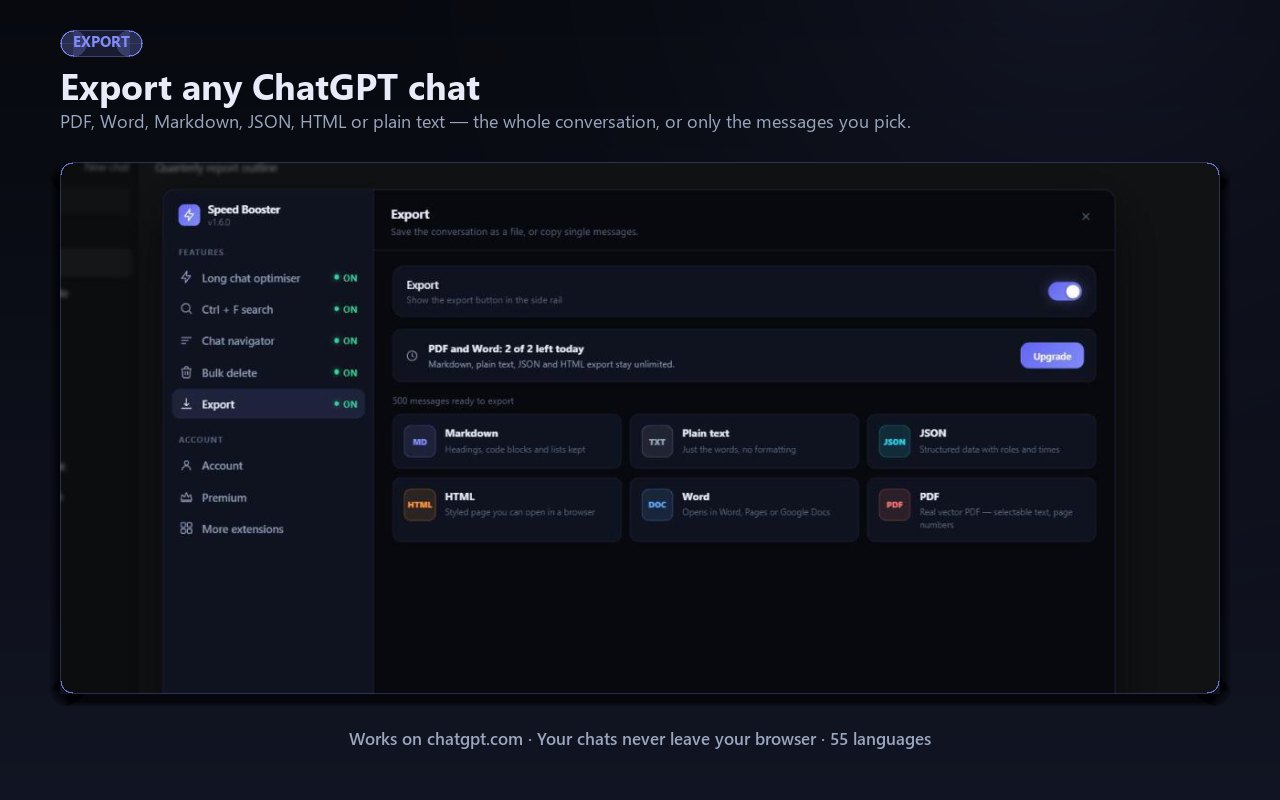
Save any chat as a file in one click. ChatGPT to PDF, ChatGPT to Word, Markdown, JSON, HTML or plain text — or copy a single message if that is all you need. The PDF is a real vector document with selectable text and page numbers, not a screenshot.
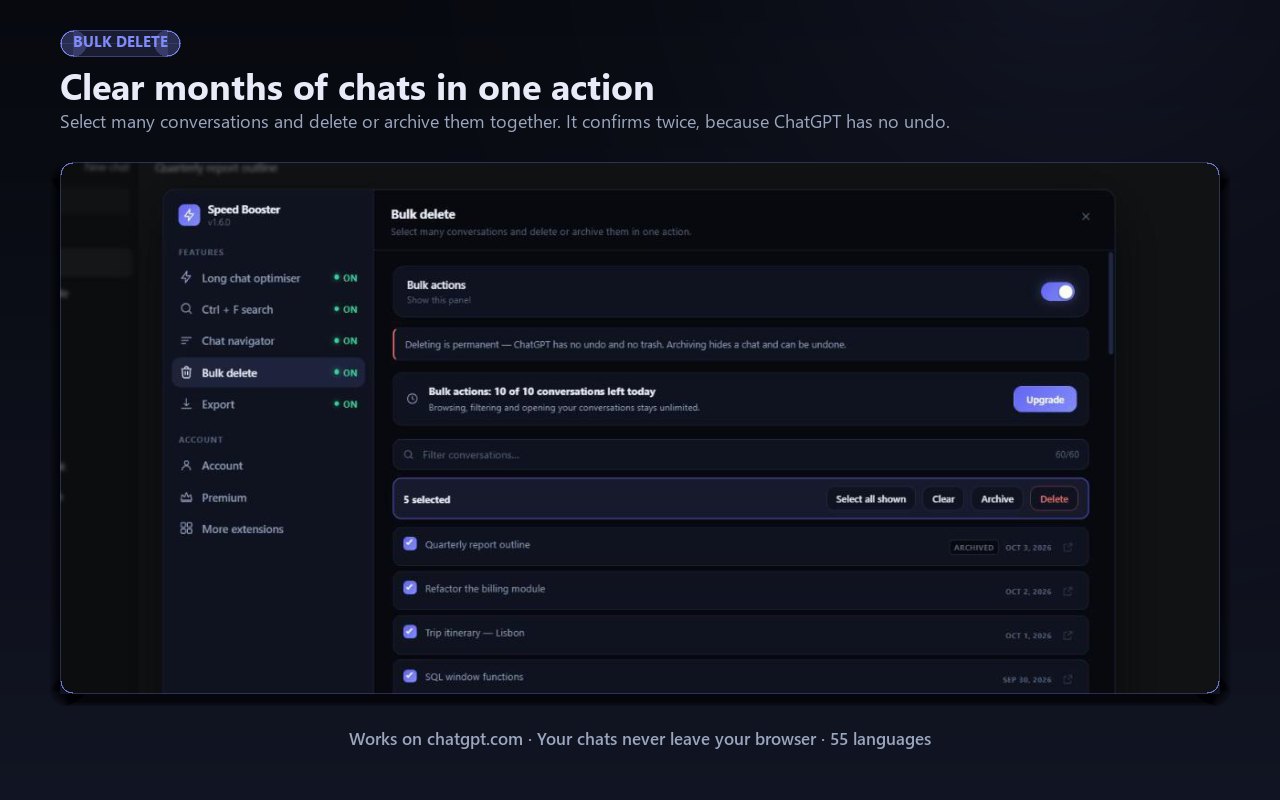
Delete all ChatGPT chats you no longer want without clicking through them one at a time. Tick several, filter by a word to catch a whole batch, then delete or archive in one go. Bulk delete asks for confirmation first, because it cannot be undone.
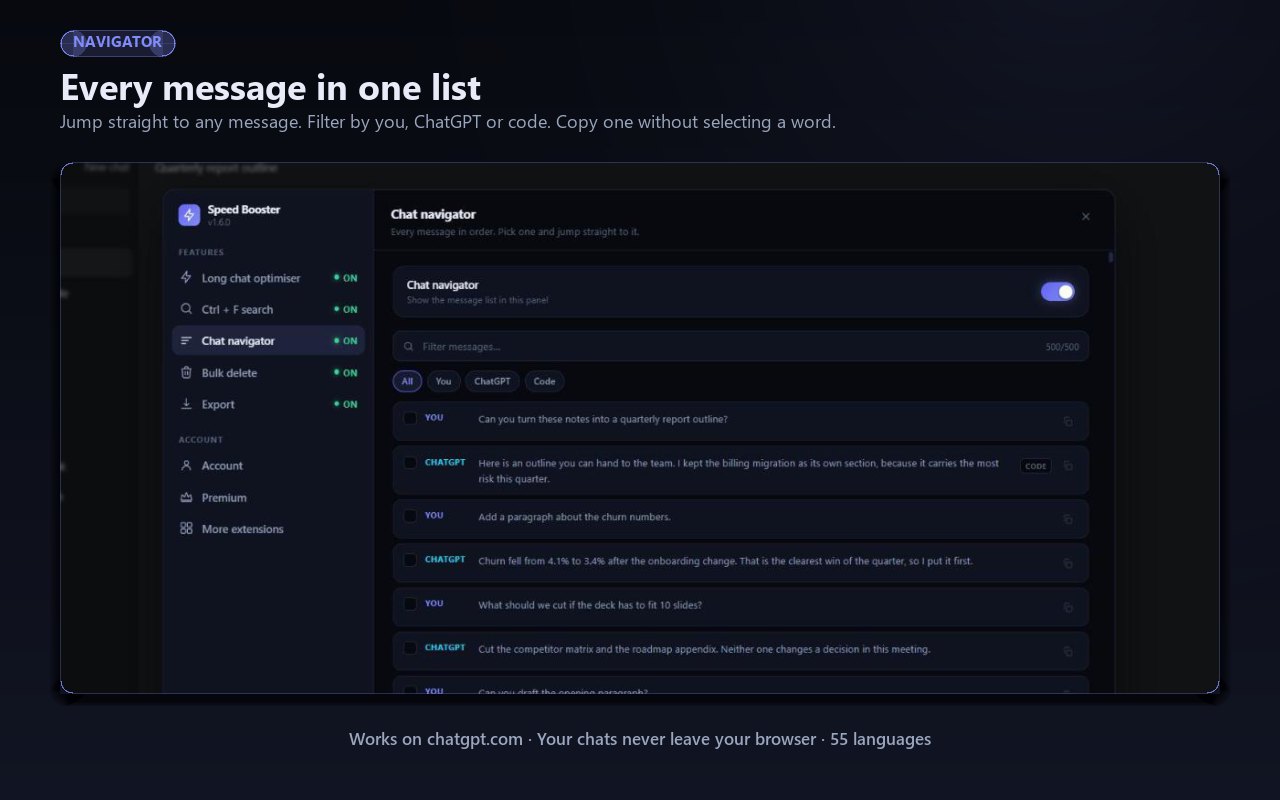
Every message in the conversation, listed in order. Pick one and jump straight to it instead of scrolling for a minute looking for the answer you half remember. Works on threads with hundreds of messages.
The browser find bar only sees what is currently rendered, so in a long chat it misses most of it. This replaces it and searches the whole conversation — including the messages that have not been loaded yet.
The feature the extension started with. Long conversations open with only the newest messages rendered, so a thread that used to crawl appears straight away. Nothing is deleted — older messages are one click away.
Exports are built inside your own browser tab and handed to Chrome as a download. Your conversations are never uploaded to a server to be converted, and the extension stores no chat content of its own.
Pick the format that suits where the conversation is going next — an archive, a document, a notes app or a script
A real vector PDF with selectable text and page numbers. Use it when you need to save a ChatGPT chat as PDF for a client, a course or your own records.
Opens in Word, Pages or Google Docs. The right choice when the conversation is a first draft you intend to keep editing.
Headings, code blocks and lists survive intact. This is the format to use for Obsidian, Notion, a wiki or a repository.
Structured data with roles and timestamps, ready to feed into a script, a dataset or another tool.
A styled page you can open in any browser or send to someone who does not use ChatGPT.
Just the words, no formatting. The smallest file and the easiest one to paste anywhere.
ChatGPT has no way to delete all chats at once. This adds one.
After a few months the sidebar fills with half-finished experiments, one-line questions and threads you will never open again. Removing them by hand means opening a menu, clicking Delete and confirming — for every single conversation.
The Bulk actions panel lists all of your conversations in one place with a filter box above them. Type a word and only the matching chats stay on screen, tick the ones you want and press Delete or Archive. Hundreds of conversations become a job of about thirty seconds.
Three steps, about a minute in total
Install from the Chrome Web Store. No account to create and no password to hand over.
Go to chatgpt.com and click the extension icon. The panel opens over the page — you do not leave ChatGPT.
Save a conversation as a file, clear out the chats you no longer need, or jump to the message you are looking for.
ChatGPT Speed Booster does not read, store, analyse or transmit your conversations. Exports are built inside your own browser tab — the PDF is assembled on your machine and handed straight to Chrome as a download, so there is no server in the middle and nothing to upload. The extension runs only on chatgpt.com and chat.openai.com, touches no other site, and collects no conversation data of any kind.
Open the conversation you want to keep, click Export in the extension panel and choose PDF. You get a real vector PDF with selectable text and page numbers — not a long screenshot. The file is built inside your browser, so the conversation is never uploaded anywhere.
Yes — six formats in total: PDF, Word, Markdown, JSON, HTML and plain text. Word files open in Word, Pages or Google Docs. Markdown keeps headings, code blocks and lists, which is what you want when the conversation is heading into Obsidian, Notion or a repository.
Open the Bulk actions panel. It lists your conversations with a filter box above them, so you can tick several at once — or filter by a word and select everything that matches — then delete them in one go. Deleting is permanent, so the extension asks you to confirm first.
Yes. The same panel has an Archive button. Archiving takes conversations out of your sidebar without destroying them, which is the safer choice when you are only tidying up.
No. Every feature runs inside your own browser tab, exported files are generated on your computer, and nothing is sent to a server to be converted. The extension collects no conversation data.
A long thread asks the browser to hold hundreds of messages on screen at once, which is heavy work for any machine. The long chat optimiser loads only the newest messages when a conversation opens, so it appears straight away. Nothing is deleted — the older messages are still there and can be brought back at any time.
Google Chrome and other Chromium browsers — Edge, Brave, Opera — on Windows, macOS, Linux and ChromeOS. It works on both chatgpt.com and chat.openai.com.
Export your conversations, clear out the chats you no longer need and find any message in seconds. Free to install, and it works the moment you open ChatGPT.
Add to Chrome — FreeNo card required • Nothing leaves your browser • Installs in seconds
ChatGPT Speed Booster is a free ChatGPT Chrome extension for people whose chat history has become something worth keeping. It started as a fix for slow, overloaded conversations and has grown into a small toolkit: export ChatGPT conversations to six different file formats, bulk delete or archive the chats you have finished with, move through long threads message by message, and search inside a conversation properly.
ChatGPT keeps your conversations behind a login, which is fine until you need one somewhere else — attached to an email, filed with a project, pasted into your notes or simply kept in case the account goes away. Copying a long thread by hand loses the formatting and takes an age.
The extension writes the whole conversation to a file instead. ChatGPT to PDF produces a genuine vector document with selectable text and page numbers, so it can be searched, quoted and printed. ChatGPT to Word gives you something you can keep editing in Word, Pages or Google Docs. Markdown preserves headings, code blocks and lists for Obsidian, Notion or a repository. JSON carries the roles and timestamps for anything you want to process with a script, and HTML and plain text cover the rest. If you also use Claude or Gemini, ExportPal does the same job across thirteen AI platforms. If you only want one answer rather than the whole thread, you can copy a single message.
ChatGPT offers no way to delete all chats at once, so a sidebar full of abandoned experiments has to be cleared one conversation at a time. The Bulk actions panel lists every conversation together with a filter box: type a word, see only the chats that match, tick the ones you want and delete or archive the lot in a single action. Deleting cannot be undone, so it asks for confirmation; archiving simply moves conversations out of the way and keeps them recoverable. Exporting first is a sensible habit if any of them are worth keeping.
The browser's own Ctrl + F only searches what is currently rendered on the page, which in a long ChatGPT thread is a small fraction of it. The extension replaces that bar and searches the entire conversation, including messages that have not loaded yet. Alongside it, the chat navigator lists every message in order so you can jump straight to the part you remember rather than scrolling for it.
A conversation with hundreds of messages asks the browser to hold all of them on screen at once. The long chat optimiser renders only the newest messages when a conversation opens, so a thread that used to take several seconds to appear shows up immediately. Nothing is deleted and nothing is sent anywhere — the older messages are still in the conversation and can be brought back whenever you want them. If you spend as much time in Claude, Claude Speed Booster does the same there.
Every part of this runs inside your own browser tab. Exported files are assembled on your computer and passed straight to Chrome as a download, so your conversations are never uploaded to a server to be converted. The extension runs only on chatgpt.com and chat.openai.com, requires no ChatGPT password, and collects no conversation data.
Discover more powerful tools to enhance your browsing experience
Instagram Unfollow AI detects those who don't follow you back and helps you unfollow them to optimize your account easily.
Manage your X (Twitter) following, detect users who don't follow you back, and unfollow safely with smart filters.
See who doesn't follow you back on TikTok, then bulk unfollow all, everyone or only non-followers. Safe pacing, one click.
Send bulk and automated WhatsApp messages safely and easily with WASendly.
Easily export WhatsApp contacts and group members to Excel, CSV, or vCard.
Save & export ChatGPT, Claude, Gemini, Grok, DeepSeek & Perplexity to PDF, Word, Markdown, HTML, JSON or Image. Private & free.
Find who doesn't follow you back on Instagram. Track unfollowers & mass unfollow non-followers in one click.
Instagram toolkit for desktop. Track unfollowers, upload stories from PC, download media, and manage Instagram.
Send bulk Telegram messages, scrape group members to Excel and add members to groups. Safe speed limits, works in Telegram Web.
Export IG follower and following lists, likes and comments to CSV, Excel or JSON in one click. Fast, private, no password.
Export tweets, replies, likes, bookmarks and followers from any Twitter/X account to Excel, CSV or JSON. No API key needed.
Export TikTok follower and following lists, video comments and post stats to CSV or Excel. Resume long exports.
Export Instagram followers, following, likes, and comments to CSV or Excel in one click
Rewrite any AI prompt into a clear, structured version in one click. Press Ctrl+M on ChatGPT, Claude or Gemini. 50+ languages, free.
IGFollow AI is an AI-powered tool to grow your Instagram. Boost engagement and expand your audience effortlessly
See exactly who doesn’t follow you back on Instagram, protect the accounts you care about, and unfollow the rest at a safe, adjustable pace.
Sort Instagram & TikTok feeds by likes, views, comments or date. See post stats at a glance and find viral content fast. Free.
AI-powered Instagram auto follow tool to boost engagement, grow followers, and expand your audience effortlessly.
Fix slow Claude.ai in long conversations. Speed Booster hides older messages to stop lag, freezing & high memory use — instantly.
Bulk delete & archive ChatGPT chats, add message timestamps and navigate conversations fast. Clean up ChatGPT in one click.
Email Extractor helps you find visible email addresses on websites and works locally with no tracking or data collection.
A visual gallery of AI image prompts. Use them instantly in ChatGPT, Gemini, Sora, and Nano Banana.

Audit any page, then crawl the whole site: indexability, duplicate titles, orphan pages, click depth and Core Web Vitals. Your pages are never uploaded.

Secure your WhatsApp Web with smart lock, panic button, and blur mode. Your privacy, your control.
Transform your cursor with stunning click effects & animations. Perfect for streamers, presenters & content creators.
InkShot is a free screenshot Chrome extension that lets you capture full page screenshots, visible viewport, or selected areas
Detechtor AI checks what any website is built with — CMS & WordPress theme detector, frameworks, analytics, CDN, tech stack.
Bulk check which numbers are on WhatsApp. Validate lists, filter by country, spot business accounts, export to Excel or CSV.
Delete all your chats and messages on Instagram in bulk. One click, and the chats you protect stay untouched.
See what a car on Sahibinden is really worth: market value for the exact trim, how damage and repaint move the price, and the engine's known faults. Turkish interface, Turkey market.
Create custom and professional email signatures effortlessly with SignedRise. Perfect for personal and work emails.